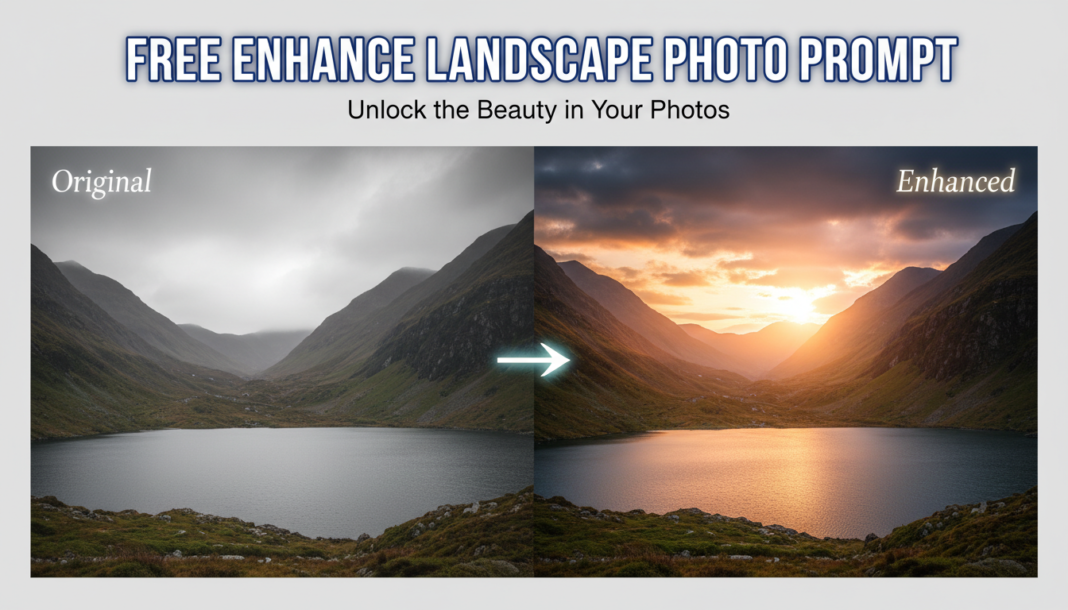
Executive Summary: Enhance Landscape Photo prompts leverage generative AI to intelligently analyze and optimize landscape imagery. They direct the AI to refine compositional elements, correct exposure, balance color, and selectively sharpen details. By manipulating parameters like atmospheric conditions, lighting, and textural fidelity, these prompts significantly elevate visual quality, transforming raw inputs into professionally graded, impactful scenes with enhanced depth and realism, simulating advanced post-processing techniques.
01. Triple Prompt Toolkit
V1 • Standard Correction
A landscape photograph, professionally enhanced, with balanced exposure, vibrant natural colors, improved contrast, and subtle sharpening. Clear sky, natural daylight. Shot on a Canon R5, f/8, ISO 100.
✍️ Editorial Tip: To adjust intensity, add “subtle” or “intense” before attributes like “sharpening” or “contrast”. Experiment with specific camera models for varied baseline aesthetics and color science.
V2 • Cinematic High-Fidelity
Breathtaking cinematic landscape, rich high-fidelity details, dramatic golden hour lighting, deep shadows, vibrant yet natural color grading, shallow depth of field, atmospheric haze, wide-angle perspective. Photorealistic, 8K, captured with an Arri Alexa LF, anamorphic lens.
✍️ Editorial Tip: Modify “golden hour” to “blue hour” or “stormy clouds” for different moods. Adjust “atmospheric haze” to “mist” or “fog” for varied environmental effects and depth.
V3 • Hyper-Realistic Detail
An ultra-detailed, hyper-realistic landscape photograph, extreme textural fidelity on rock formations and foliage, razor-sharp focus from foreground to background, intricate micro-details, pristine clarity, enhanced dynamic range, vivid accurate colors, photorealistic, 16K. Taken with a GFX 100S, deep focus stacking technique.
✍️ Editorial Tip: Change “rock formations and foliage” to specific elements like “desert dunes” or “frozen tundra” to direct detail enhancement. Alter resolution like “16K” to “8K” or “4K” for rendering speed vs. fidelity.
02. Pro Customization Table
| Variable | Replace With | Result | Impact |
|---|---|---|---|
| **Lighting Condition** | “blue hour,” “overcast,” “sunrise,” “midday harsh light,” “moonlight” | Alters the overall mood, shadows, highlights, and color temperature of the scene. | High |
| **Detail & Sharpness** | “soft focus,” “dreamy bokeh,” “ultra-sharp,” “intricate micro-textures” | Controls the level of perceived detail, clarity, and the focal depth within the image. | High |
| **Color Grading/Palette** | “desaturated muted tones,” “vibrant lush colors,” “monochromatic,” “warm analog style,” “cool misty palette” | Defines the dominant color scheme and emotional atmosphere of the landscape. | Medium-High |
| **Atmospheric Effect** | “dense fog,” “light mist,” “heavy rain,” “snow flurry,” “clear crisp air,” “dusty haze” | Introduces or removes environmental elements, affecting depth, mood, and visibility. | Medium |